Hotels.com: Travel Booking2026.36.0
Publisher Description
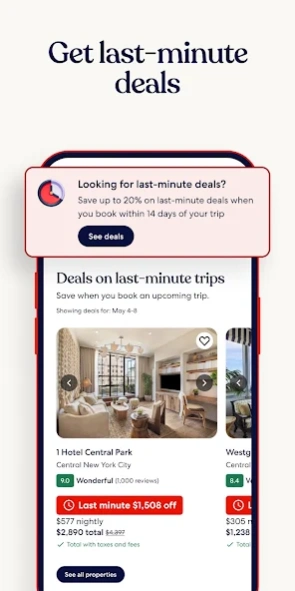


Find your perfect somewhere with last minute hotel & travel deals!
Find and book your perfect somewhere with the Hotels.com app.
GET REWARDED THROUGH OUR APP
-Access Member Prices* of 10% or more on over 100,000 hotels worldwide.
- Join One Key™, our travel program that unlocks a world of instant benefits and perks.
- Earn OneKeyCash™** and use this whenever you want and instantly save on your next trip on Hotels.com, Expedia and Vrbo when you book eligible hotel stays, flights, vacation rentals, car rentals, and more.
- One Key Silver, Gold and Platinum members can enjoy extra perks at select VIP Access properties.
FIND THE ONE THAT’S JUST RIGHT FOR YOU
- Choose from over 500,000 properties worldwide.
- Whether you’re planning a short hotel stay, last minute weekend getaway, long vacation, business trip, or anything in between, we have a property for every kind of travel.
- Enjoy the flexibility of free cancellation on most hotels***.
- Compare hotel prices, ratings and amenities side-by-side using our comparison tool.
- Use Trip Planner to organize your travel plans in one place. Save your favorite hotels, vacation rentals, resorts and more, and share these with friends and family.
- See the hotel or vacation rental location on a map and read verified guest reviews.
FAST, EASY, & SECURE BOOKING ON OUR APP
- It only takes a few taps to book your hotel.
- Pay now or later on most hotels.
- Save your payment details to book future trips even faster.
- Last minute hotel booking.
OUR APP IS YOUR PERFECT TRAVEL COMPANION
- Save your confirmation and access your hotel or vacation rental booking details anytime – even offline.
- Easily manage your hotel or vacation rental booking on the go.
- Contact us or the hotel or vacation rental owner directly from the app.
- Opt-in for push notifications and we’ll send you updates about your hotel stay.
*Member Prices are available on select hotels to logged in members and app users. The discount will be applied to the price of selected hotels (excluding applicable taxes and other fees). Subject to terms and conditions, see site for details.
**OneKeyCash™ is not redeemable for cash and can only be used on Expedia, Hotels.com and Vrbo.
***Free cancellation on most hotels. Some hotels require you to cancel at least 24-48 hours before check-in. See property pages on our app for details.
This app uses tracking technology. As disclosed in our Privacy Statement, we and our partners may collect personal information and other data. By using our app, you accept our Privacy Statement and Terms of Service.
The Hotels.com app uses information for analytics, personalization, and advertising. By downloading our hotel app, you agree to our privacy and cookies policies https://hotels.com/customer_care/privacy.html.
About Hotels.com: Travel Booking
The company that develops Hotels.com: Travel Booking is Hotels.com LP. The latest version released by its developer is 2026.36.0. This app was rated by 2 users of our site and has an average rating of 4.0.
To install Hotels.com: Travel Booking on your Android device, just click the green Continue To App button above to start the installation process. The app is listed on our website since 2026-09-04 and was downloaded 104 times. We have already checked if the download link is safe, however for your own protection we recommend that you scan the downloaded app with your antivirus. Your antivirus may detect the Hotels.com: Travel Booking as malware as malware if the download link to com.hcom.android is broken.
How to install Hotels.com: Travel Booking on your Android device:
- Click on the Continue To App button on our website. This will redirect you to Google Play.
- Once the Hotels.com: Travel Booking is shown in the Google Play listing of your Android device, you can start its download and installation. Tap on the Install button located below the search bar and to the right of the app icon.
- A pop-up window with the permissions required by Hotels.com: Travel Booking will be shown. Click on Accept to continue the process.
- Hotels.com: Travel Booking will be downloaded onto your device, displaying a progress. Once the download completes, the installation will start and you'll get a notification after the installation is finished.
Program Details
System requirements
Download information
Pricing
Version History
version 2026.36.0
posted on 2026-09-04
We continue to update our app to help you find your perfect somewhere.
version 2025.41.2
posted on 2025-10-23
version 23.27.0
posted on 2023-07-13
Introducing One Key™, a new program that unlocks a world of travel rewards across Expedia, Vrbo, and Hotels.com. Members get access to instant discounts and perks with the ability to earn and use OneKeyCash™ on eligible hotels, flights, vacation rentals, car rentals and more.
version
posted on 2021-08-31
We've updated our app. You can now get your reward nights even faster on our app with app exclusive offers.
version
posted on 2021-07-06
We've updated our app to make it easier for you to get information about travel restrictions and change your plans accordingly. Please check back frequently if you have concerns about current or future bookings.
version 52.5.1.1.release-52_5
posted on 2020-04-15
Thanks for using Hotels.com!
If you love to travel, you'll love our app. We're working hard to make the Hotels.com app the most rewarding place to book a stay. This update includes performance enhancements and bug fixes-so it's even easier to find the perfect place to stay for your next trip.
version 50.0.1.8.release-50_0
posted on 2020-01-28
Hotels.com regularly updates our app to bring customers the features and fixes that help them find and book the perfect hotel.
Thanks for using Hotels.com! Please keep telling us what you think by reviewing our app and rating us 5 stars.
version
posted on 2016-09-09
• New personalised home page,Your home page now shows you the information you need. About to head off on a trip? We’ll show you all the details about your hotel. In the middle of planning? the home page will show exactly where you left off, no matter what device you were on before. You can also see all this even when you’re offline.,We’ve also fixed a few things to improve your experience and help the app run smoothly.
version 1.1
posted on 2011-04-13
Several fixes and updates
